Solovista Signature Script for Web Design
There’s something about a well-chosen font that can transform a website from ordinary to unforgettable. Recently, I found myself testing Solovista Signature Script in a boutique online store layout, and it quickly became one of my favorite display fonts for digital projects. As a web designer, I always look for typefaces that balance creativity with usability, and this script font checks both boxes beautifully.
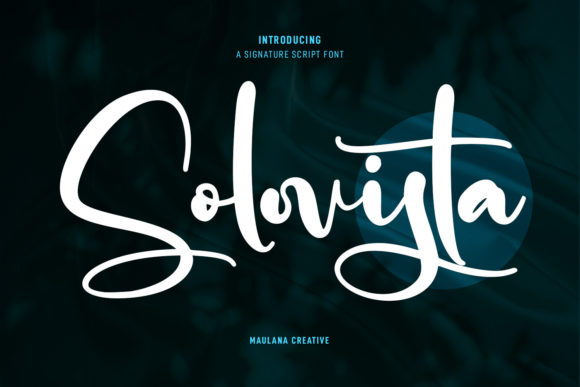
Solovista Signature Script is a modern script font with regular contrast strokes, fun characters, ligatures, and alternates. It has a friendly yet refined look that makes it perfect for creative brands looking to add a personal touch without sacrificing professionalism. The visual personality of the font feels approachable but still has an air of elegance—like the handwritten note you’d receive from a close friend, but with just the right amount of polish.
A Hero Section That Feels Inviting
I first tested Solovista Signature Script in the hero section of a boutique clothing website. The goal was to create a headline that would draw attention while maintaining readability on both desktop and mobile screens. When I applied the font to the main heading, it immediately felt more dynamic than the standard sans serif options I had used before. The curves and flow of the letters added movement to the design, making the text feel like it was alive.
One thing I noticed early on was how well it paired with a clean sans serif font for body copy. By using Solovista Signature Script for headings and a simple font like Helvetica Neue for paragraphs, I created a clear visual hierarchy that guided users through the content effortlessly. This combination helped maintain brand consistency while keeping the site visually engaging.
Mobile Responsiveness and Readability
When designing for the web, mobile responsiveness is non-negotiable. I tested Solovista Signature Script across several screen sizes and found that it maintained its charm even at smaller sizes. While it’s not ideal for long blocks of text, it shines when used sparingly for short phrases, headlines, or call-to-action buttons.
For example, using it in a CTA button like “Shop Now” gave the button a unique character that stood out against a minimalist background. I also experimented with placing it over image banners and found that it worked especially well when there was enough contrast between the text and the background. On dark backgrounds, the font remained legible and didn’t lose its visual appeal.
It’s important to note that Solovista Signature Script may not be suitable for small navigation text or form labels due to its decorative nature. However, as a display font, it excels in creating focal points that capture attention without overwhelming the user.
Branding and Emotional Appeal
The emotional appeal of a font can greatly influence how users perceive a brand. Solovista Signature Script brings warmth and personality to any digital project, which is especially valuable for creative businesses like art studios, handmade shops, or lifestyle brands. Its modern yet handwritten feel helps establish a connection with the audience, making the brand feel more relatable and trustworthy.
I used it in a blog redesign where the client wanted to emphasize storytelling and community. The font was used in headings and subheadings throughout the site, reinforcing the idea of a personal, authentic experience. Users commented that the typography made the content feel more inviting and easier to engage with.
For designers looking to build a strong brand identity, pairing Solovista Signature Script with a complementary sans serif or serif font can help create a balanced and cohesive visual language. This approach works particularly well in editorial design, portfolio sites, and campaign landing pages where the tone needs to be both creative and professional.
Practical Tips for Using Solovista Signature Script Online
Before implementing Solovista Signature Script into a live project, it's essential to check the font’s webfont availability, file formats, and licensing terms. Make sure it supports all the languages and characters needed for your audience. Also, consider how it will render on different devices and browsers to ensure consistent performance.
If you're using it for digital downloads, templates, or brand assets, confirm that the font includes all necessary styles, weights, and alternates. For best results, pair it with a clean body font that complements its style and ensures readability across all elements of your site.
Solovista Signature Script is a versatile and expressive font that adds character to any digital project. Whether you're designing a landing page, a course sales page, or a promotional banner, it offers a unique way to stand out while maintaining a professional look. With thoughtful use and smart pairing, this script font can become a powerful tool in your web design toolkit.